
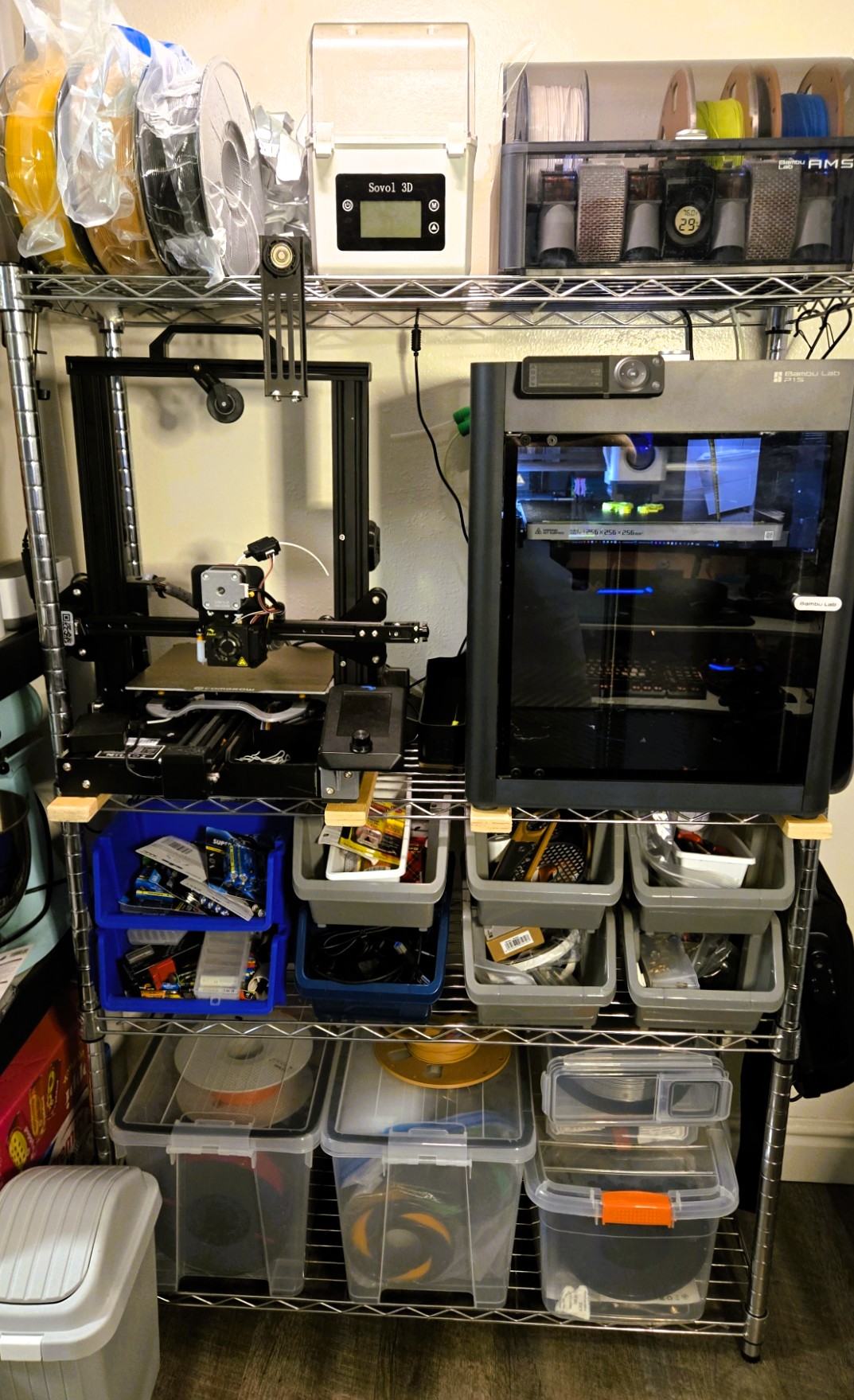
Recently consolidated and organized my 3D printing corner and here it is going from the bottom-up left to right:
Bottom shelf: Bulk filament storage, first two containers were air sealed using weatherstripping, there’s also two air-tight cereal box containers which will be transformed into sealed individual filament dispensers
Next shelf: Small materials, tools and supplies, batteries, magnets, bearings, glue/resin, foam and tooling and replacement parts for the two printers
Printer shelf:
- Ender 3 Pro converted into V2 with custom upgrade kit from 1stLayer which included a bigger and color LCD screen, upgraded board with silent steppers. Also installed a direct extruder kit, BL Touch for automatic bed leveling, and a Creality Cloud module. I’m keeping this printer with a 1mm nozzle to tackle bigger structural prints where detail and speed aren’t as important. There’s also the possibility to increase the print height with existing materials.
- Bambu Lab P1S, this is the intermediate level of their printers, twice and sometimes thrice as fast as the Ender, CoreXY which eliminates bed slinging for more accurate prints, fully enclosed and as easy to use as an inkjet paper printer.
Top shelf: filament dispensing and storage, there’s some recently used filament spools inside vacuum sealed bags, a dual filament dryer which I use to also dry desiccant and the amazing Bambu Lab AMS (Automatic Material System) which is the next biggest thing for 3D printing. I got this AMS as a bundle with the P1S and I totally love it, besides multi-color printing, it contains four material/color spools ready to go at any given time in a semi-sealed container. I printed desiccant containers to add inside to help reduce/eliminate moisture.
This was a quick tour, nothing much or big but finally organized and ready to go.
 L21 Degrees of Awesomeness